Top 5 Website Navigation Best Practices to Maximize Customer Conversions

Converting website visitors into paying customers requires more than implementing great design. In fact, your navigation, which is part of your site’s structure, has to work seamlessly. After all, the reason people visit your website is learn more about your business, and hopefully purchase your products or services. As such, following website navigation best practices ensures users can easily find what they need quickly.
Continue reading to learn how website navigation best practices can improve user experience and boost conversions.


The significance of website navigation
Is your website easy to navigate? You can see how long visitors stay on your pages by looking at your bounce rate in your analytics reports. A high bounce rate is generally an indicator that you either don’t have what users are looking for or they are having difficulty finding it. In either case, they quickly leave your website.
If you don’t know this, you have 50 milliseconds to make a good first impression, which is a tiny fraction of a second. This short time span is due to several factors. First, there are literally billions of websites and it’s highly likely that a good percentage are in your industry. Second, people are busier that ever so time is money and they simply don’t want to wait. And third, most people shopping online these days are doing so from their mobile devices.
So, given that mobile screens are fairly small compared to desktop computers, they need to quickly find what they are looking for. Regardless if it’s company/staff details, a specific product, or even services.
Fortunately, there are several things you can do to improve your website navigation, including adhering to best practices to boost conversions on your website.
5 website navigation best practices to improve conversion
Unfortunately, website navigation is not priority for some websites. This is where a professional website design agency can make a huge difference compared to DIY website design. Website maintenance is not always easy, and it’s important to allocate time to revisit your site to ensure you’re following these practices.
#1. Limit your top-level menu items
Since fewer choices make decision-making easier, aim for 5 to 7 core menu items in your primary navigation. Then if you have more content, it can be organized with dropdown menus or a structured mega menu. This is super important because a clean menu reduces overwhelm. It also helps users focus on your most important pages like your conversion funnel, service or product pages.
#2. Optimize for mobile use
More than half of web traffic now comes from mobile devices. So not everyone sites in front of their large desktop computer screens navigating your website. Make sure your mobile menu is not only easy to find, but also easy to tap, and scroll. Some suggestions include large tap targets, a clean hamburger menu, and sticky mobile nav bars. Mobile-friendly navigation ensures conversions don’t drop on smaller screens.
#3. Add search functionality
A search bar helps visitors quickly locate specific information, especially on content-heavy or e-commerce sites. Be sure to place it in a highly visible location like in the header. Generally, users who are are high-intent buyers. A strong site search system can dramatically increase conversions.
#4. Use effective web design to aid navigation
It’s important to keep in mind that not everyone will enter your website from your homepage. If some visitors don’t start on your home page, then you should provide clues about where they are and how to get to other pages.
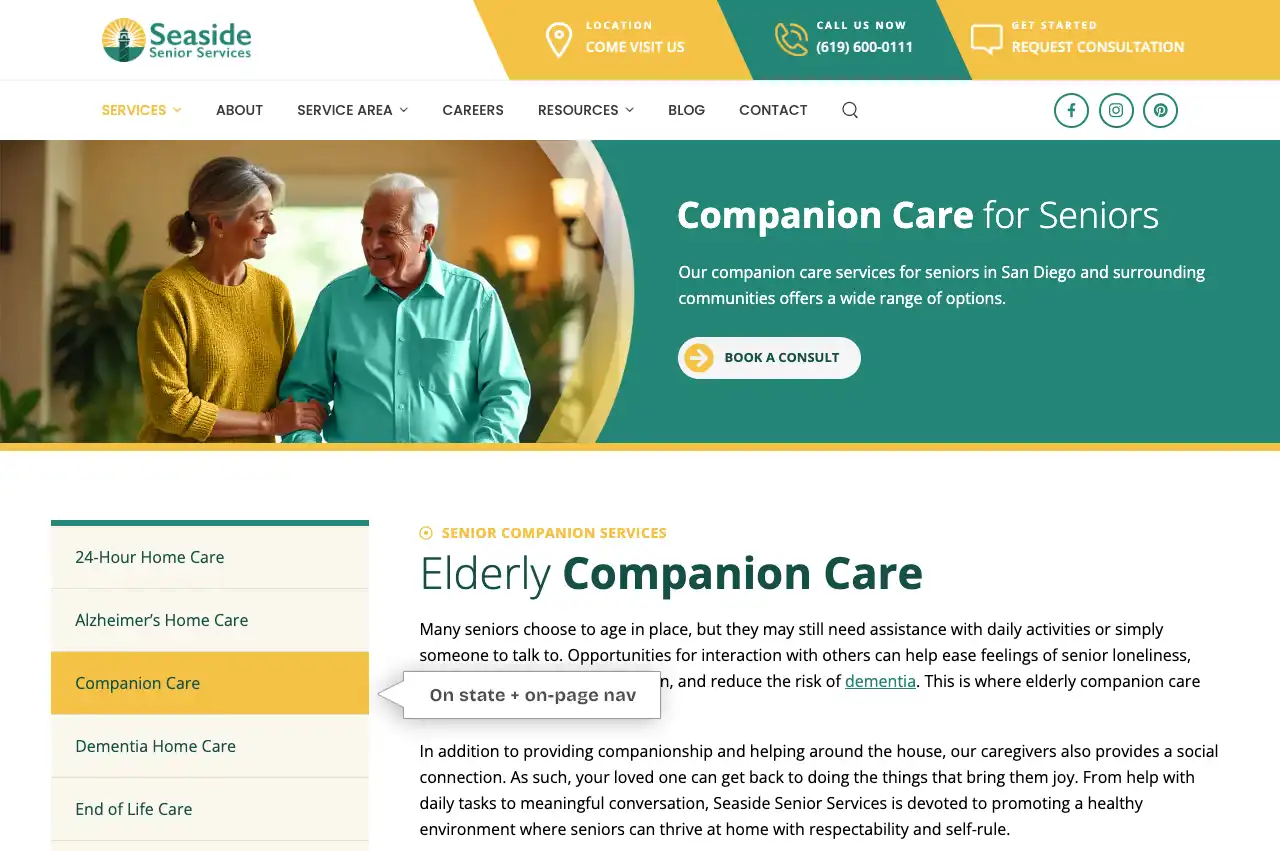
A good example of this is our Seaside Senior Services client’s website below. At the top on the main menu, “Services” link is in a different color than the other navigational links, indicating where you are on their website. We also included an on-page left side menu which highlights the Service page that they are on. In this case, it’s the “Companion Care” page. This type of design thoughtfulness creates a seamless user experience as they do not have to guess where they are.
While sitemaps are also a type of navigation, we don’t recommend forcing your visitors to use it. In fact, the organization of your website should be clear enough that a sitemap is unnecessary. We are not talking about the sitemaps that are generated by an SEO plugin. Instead, we are referring to a manually created sitemap which some sites have on a page by itself.
#5. Keep your navigation current
Most businesses start off with a navigation that is uncluttered and well-organized. But as the business grows, common problem arise that throws the navigation out of whack and it no longer make sense. For example, when new pages are added, they are not always added to the appropriate place on the navigation menu.
In addition, keep your navigation intuitive and simple. In short, avoid overly creative labels or technical jargon that confuse visitors. Instead, use meaningful menu terms like Home, About, Service, etc. This matters because simplicity reduces friction and help users instantly understand where to go next, which leads to higher conversion rates.
Final thoughts
Strong navigation serves as a powerful conversion tool. By following these website navigation best practices, you can create an intuitive, smooth experience that builds trust, and guides users toward taking action. When users can easily find what they’re looking for, your chances of converting them increase significantly.
Does your website navigation need help? Whether you want to create a new website and aren’t sure where to start or you need to reorganize your website following a business restructure, we can help. Talk to us about how we can implement these website navigation best practices to help you attract and convert customers.
You may also enjoy reading: 5 Reasons Blog Writing Boosts Your Business Offline

Hazel Burgess
FOUNDER/SEO DIRECTOR
Hazel is the Founder & SEO Director at Envisager Studio, a premier website design agency specializing in WordPress website design, development and internet marketing. In her spare time, she writes about search engine optimization, website design, and internet marketing.
Related Posts